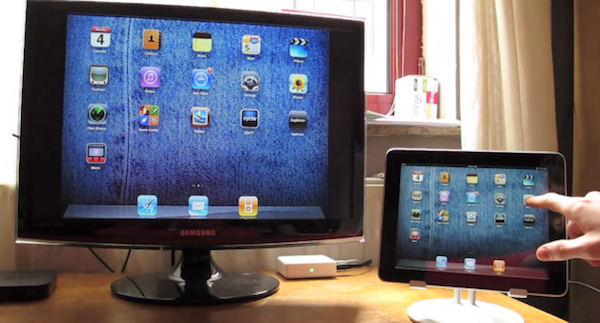
One of the new features of the iPad 2 is the ability to do video mirroring with Apple’s Digital AV Adapter or VGA Adapter. Any app on your iPad 2 can be mirrored to your TV, DV projector or monitor. Apple decided to make this an iPad 2-only feature, even though the original iPad’s hardware is capable of doing it. Now, thanks to the jailbreak community, you can enable video mirroring on the original iPad with a few simple steps.
Follow these steps on your jailbroken iPad 1:
- Navigate to system/library/coreservices/springboard.app;
- Download the K48AP.plist file on your computer;
- Add the string “display-mirroring boolean YES” and make sure the file looks like the image below:
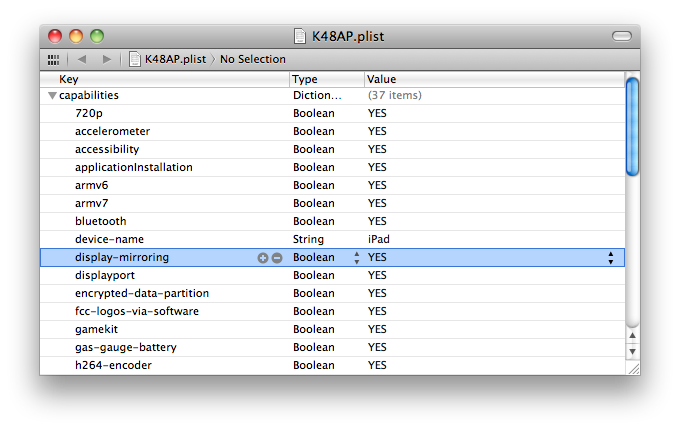
- Upload the modified file back to the iPad (you can use an app like Cyberduck for this, and make sure OpenSSH is installed on the iPad), restart the device;
- Start video mirroring using either the VGA or Digital AV Adapter.
Check out the video below to see a demo:
Source: Nature’s Eye Studios